









Working papers
One connected workflow, from bookkeeping to filing
Silverfin’s working papers sync live with your clients’ bookkeeping, scope the work, and pre-fill the annual accounts and corporation tax from the same file.
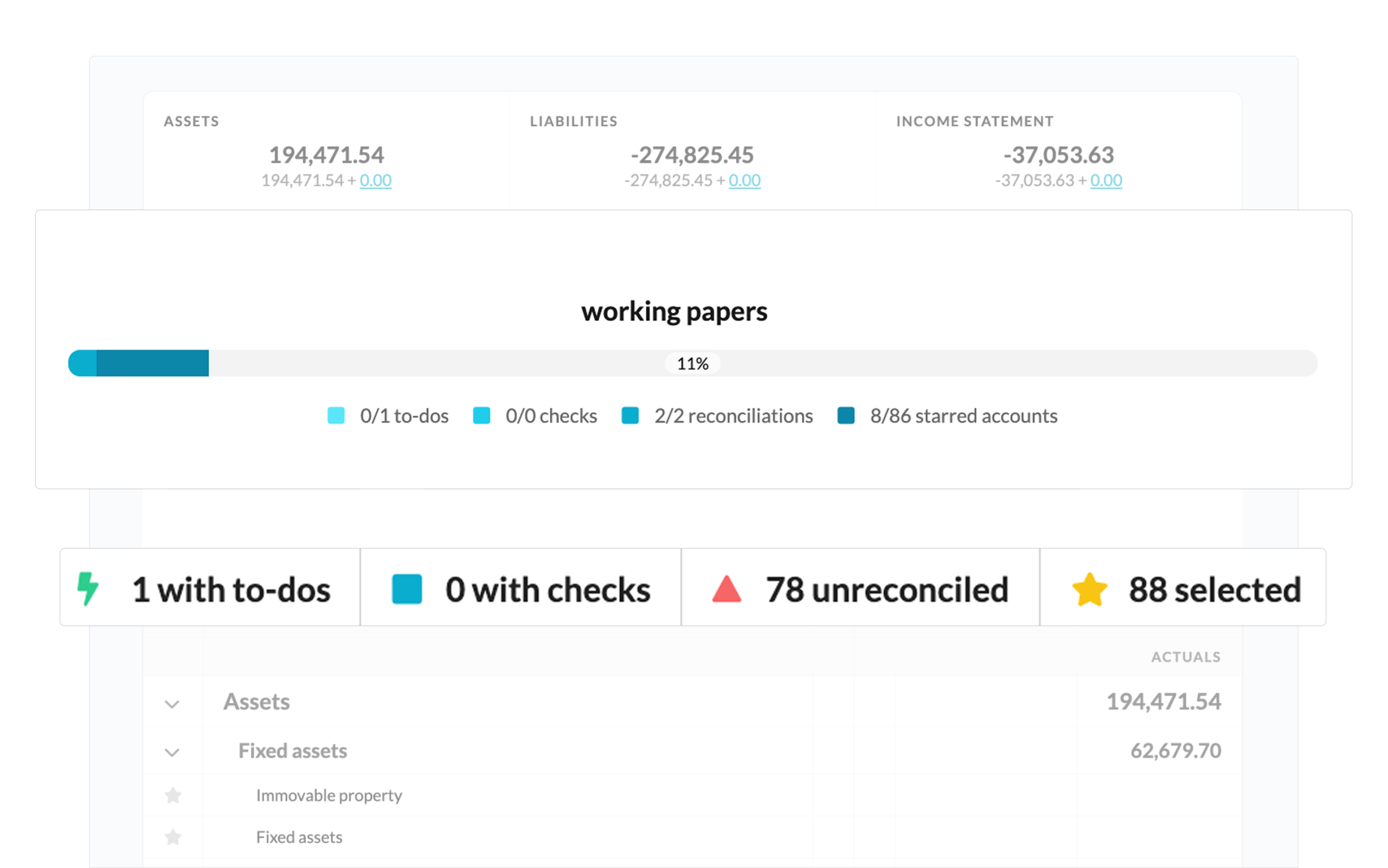
Compliance that flows
Compliance usually runs across separate tools, one for working papers, another for annual accounts, a third for tax. Each needs the same data entered again. And when a client’s bookkeeping changes in month eleven, nothing tells you what that change just invalidated.
Silverfin connects the chain. Bookkeeping flows in and stays current, the work is scoped and standardised before anyone starts, and everything downstream arrives pre-filled.
Without Silverfin
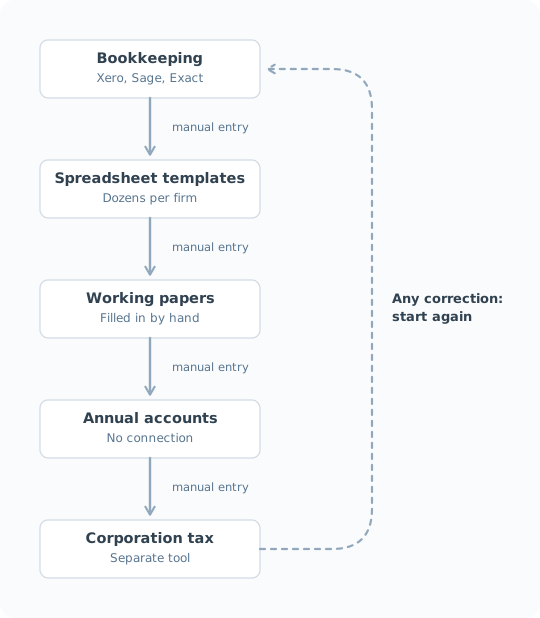
Every step is manual.
Nothing tells you what a late change invalidated.
With Silverfin
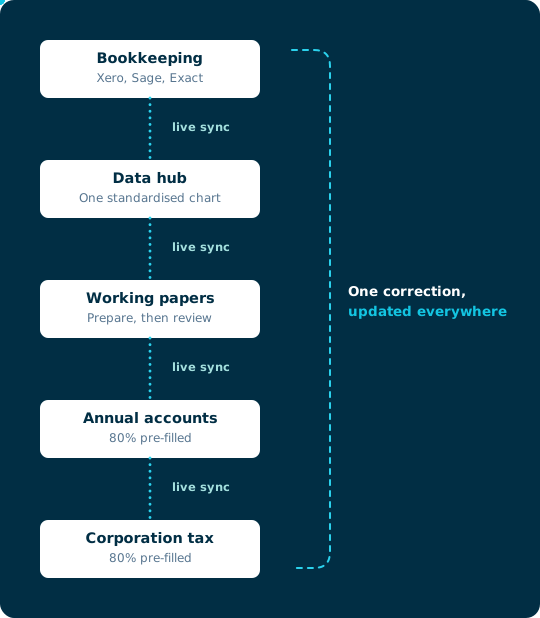
One live client file, always current.
Change a figure and Silverfin flags everything downstream.
Integration
Your numbers are never out of date
Silverfin pulls each client’s figures, keeps them current, and structures them ready for the work. Your team never re-enters a figure or exports to a spreadsheet.
Silverfin connects directly to Xero, QuickBooks, Sage, Exact, Twinfield, Yuki and 50+ other systems, then structures what comes across so it’s ready to work with. Not a one-off import, and not a mirror of your client’s bookkeeping.

Connected at the source
You authorise the connection once per client, and Silverfin keeps it open and pulls the figures itself. Nobody starts a job by exporting a trial balance, and if a connection does drop, the file says so rather than quietly going stale.

Groundwork you don’t have to do
Silverfin doesn’t just hold a copy of the figures, it gives them a structure. Every client’s history and current position sit in one place and in one shape, and that’s what everything after this is built on: the templates, the standards, the annual accounts and the tax return.
Standardisation
Every client file to the same standard
Silverfin standardises every client’s chart of accounts, then sets the scope of work from the type of client. Everyone on the team sees the same requirements, working from the same templates and the same current version of them.
Quality stops depending on who picked up the job, or which office they sit in. New joiners don’t have to learn one partner’s habits before they’re useful.

No more chasing the latest template version
Templates are maintained centrally and applied to every client file, so nobody works from a copy saved to a desktop two years ago. Which templates a file gets follows from the client type, whether that’s a sole trader, a company filing corporation tax or annual accounts only, so the scope is settled before anyone opens it.

Any chart of accounts, one standard
Whatever your client’s bookkeeper called an account, Silverfin maps it to the same standard you use across the portfolio. Mapping lists are maintained for every market Silverfin operates in, so onboarding a new client takes minutes instead of an afternoon of manual mapping.
Oversight
Know where every file stands, without asking
Everyone works in the same file at the same time, so there’s never a question of which version is current. Queries, documents and review notes sit with the account they relate to, and preparers and reviewers work in the same place.
The harder problem is knowing when work that was signed off has quietly stopped being right. A late bookkeeping adjustment can make a reviewer’s sign-off wrong months after they gave it, and nothing in a folder of spreadsheets will tell them.

Status you can read at a glance
Look across your portfolio to see where every client stands, or open a single file to see what’s done, what’s outstanding and who signed it off. No status meeting, no chasing, and no one person holding the whole picture in their head.

Late changes re-open the work they affect
A late bookkeeping adjustment re-opens the reconciliations it touched and clears the review sign-offs that no longer hold. The disclosures and tax schedules built on the old figure get flagged too, so nobody has to work out what a change broke.

Every year makes the next one sharper
Your first year in Silverfin sets the baseline. From then on every client file is measured against its own history, so movements that don’t make sense surface while you’re still in the file rather than in a client meeting three weeks later. The longer you’re on the platform, the more there is to compare against.
Automation
Enter the data once, if at all
Because every stage reads from the same structured data, a figure only gets entered once, and most never get entered by a person at all.
The annual accounts and corporation tax templates arrive around 80% pre-filled from the working papers your team already reconciled.

The spreadsheets get typed up for you
Car park schedules, stock counts and lease details don’t come from the bookkeeping, so someone has to key them in. Upload the spreadsheet or PDF and Silverfin Assistant fills the fields for you. You approve or reject each suggestion, so nothing lands in the file you haven’t seen.

You set a client up once
The structure, mappings and recurring workings you build in the first year carry into every period after it. Nothing gets rebuilt from scratch, so the second year and every one after starts from a working file rather than a blank one.

Annual accounts and tax, 80% filled in
Because the annual accounts and corporation tax templates read from the same standardised data your team already reconciled, they arrive around 80% pre-filled. A fixed asset you reconciled in the working papers appears in the related disclosure and in the tax schedule, without an export, an import or a disclosure journal.
Advisory work without more data entry
Reporting, portfolio analysis, client meetings and client access all read from the compliance work your team already did.

Reporting
Client-ready reports straight from the compliance data, without rebuilding the numbers.

Insights
When a regulation changes, find every client file it affects in one search rather than a week of checking.

Talking Points
Turn what you noticed during review into a client conversation, prepared and recorded in the same place.

Pulse
Give clients the reports they ask for, and a view of where their file has got to.
Silverfin Assistant, across the whole workflow
The Assistant types up the spreadsheets you upload, flags the movements worth checking at review, and suggests what’s worth raising with the client. Same assistant, same data, every stage.
See the whole chain in your own client files
Book a demo and we’ll walk one of your clients through the full flow, from live sync to filed accounts.
FAQs
What are working papers in Silverfin?
Working papers in Silverfin are the cloud files where your team reconciles a client's accounts once the bookkeeping is done. They pull live data from the client's accounting system, apply your firm's standardised templates, and feed the compliance work that follows. Everything else on the platform reads from that same file.
How does the live bookkeeping sync work?
You authorise a connection to each client's accounting system once. Silverfin then pulls figures across as the bookkeeping changes, rather than importing a snapshot someone has to remember to refresh. Data is mapped to a standardised chart of accounts on the way in, so it arrives ready to work with rather than needing preparation first.
Which bookkeeping systems does Silverfin connect to?
Silverfin connects to most modern bookkeeping systems, including Xero, QuickBooks, Sage, Exact, Twinfield and Yuki.
How does Silverfin know what work a client file needs?
Two things set the scope. Silverfin maps the client's chart of accounts to a standardised one, using mapping lists maintained for each market, so the data arrives in a consistent shape. You then set the client type, such as sole trader, corporation tax or annual accounts only, and Silverfin selects the templates that type needs and stars the accounts that count towards completion.
What happens when a client's bookkeeping changes after I've finished the working papers?
Silverfin re-opens the work that change affects. Accounts you'd reconciled go from a green dot back to a red triangle, prepared and reviewed marks are cleared, and the disclosures and tax schedules built on the old figure are flagged. Nobody has to work out what a late adjustment invalidated, because Silverfin tracked the dependencies as the work was done. Where working papers, accounts and tax sit in separate products, that same change stays invisible downstream.
How much of the annual accounts and corporation tax is pre-filled?
Around 80%, because both read from the same reconciled data rather than a fresh import. A fixed asset you reconciled in the working papers appears in the related disclosure and in the tax schedule, without an export or a disclosure journal. The figures you do enter, you enter once, and you can trace any number on the face of the accounts back to the working paper it came from.
How do prepare and review stages work?
A preparer reconciles the accounts, marking each one as they go, then hands the file to a reviewer who signs off in the same file rather than a separate copy. Comments, queries and supporting documents sit with the account they relate to. Every action is logged, so the audit trail builds itself. If something upstream changes, the marks it affects are cleared.
Can I enter data that isn't in the bookkeeping?
Yes. Car park schedules, stock counts and lease details usually arrive as a spreadsheet or a PDF. Upload the file and Silverfin Assistant reads it and fills the relevant fields in the working paper. You approve or reject each suggestion, so nothing lands in the file you haven't seen.